发布于 ,更新于 

🍵 Gitea Actions 折腾踩坑小记

最近 GitHub 的稳定性每况愈下,我便把自己的某个项目迁移到了自部署的 Gitea。Gitea 支持和 GitHub Actions 类似的 CI/CD 功能,大部分 Actions 只需要简单修改并挪个位置就能用,但还是存在一些坑,本文来记录下。
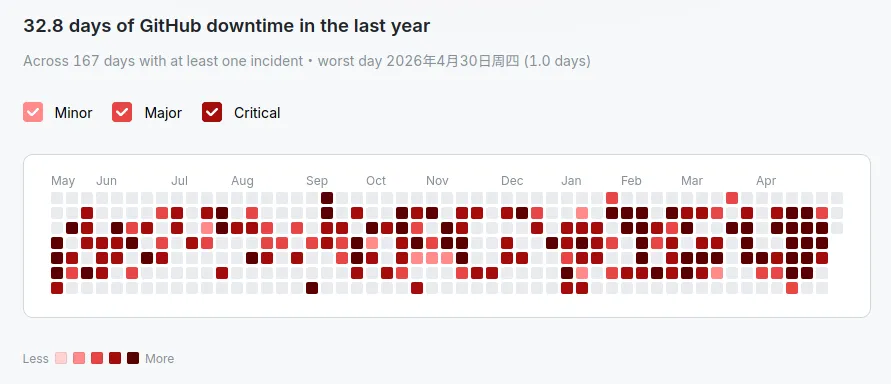
难绷的 GitHub 崩溃图表
难绷的 GitHub 崩溃图表

🛠 部署

Gitea Actions 用来跑工作流的程序被称为 Act Runner,需要宿主机装有 Docker(我没有试过 podman 行不行),参照官方文档即可完成简单部署和注册。

🗑 缓存服务器

官方的部署文档中有一个坑 —— 默认没有配置缓存服务器。Gradle、pnpm 这种比较依赖缓存的构建系统在默认配好的 Act Runner 上会跑得很慢。

首先修改配置文件 config.yamlcache 一节:

config.yaml
1
2
3
4
5
6
7
8
9
10
11
12
13
14
15
16
17
18
19
20
21
22
cache:
# Enable cache server to use actions/cache.
enabled: true
# The directory to store the cache data.
# If it's empty, the cache data will be stored in $HOME/.cache/actcache.
dir: ""
# The host of the cache server.
# It's not for the address to listen, but the address to connect from job containers.
# So 0.0.0.0 is a bad choice, leave it empty to detect automatically.
host: "宿主机的局域网IP"
# The port of the cache server.
# 0 means to use a random available port.
port: 8088
# The external cache server URL. Valid only when enable is true.
# If it's specified, runner will use this URL as the ACTIONS_CACHE_URL rather than start a server by itself.
# The URL should generally end with "/".
# Requires external_secret below to be set to the same value on both this runner and the cache-server.
external_server: ""
# Shared secret between this runner and the external `gitea-runner cache-server`. Required when external_server
# (or `gitea-runner cache-server`) is in use: the runner pre-registers each job's ACTIONS_RUNTIME_TOKEN with the
# cache-server, and the cache-server enforces bearer auth + per-repo cache isolation.
external_secret: "一个随机数"

host 配置为宿主机的局域网 IP(因为工作流环境是独立的 Docker 容器,填宿主的 Docker 网桥 IP 也可行但显然直接写局域网 IP 更省心)。

如果采用 Docker 部署,那么 port 需要填写一个值,否则可以留空。

最下面的 external_secret,可以随机生成一个写进去。如果不写这行,那么缓存功能不会被启用。这就是官方文档没写的坑。

如果采用 Docker 部署还应修改 docker-compose.yml,增加一行:

docker-compose.yml
1
2
ports:
- "8088:8088"

这里的内外端口必须一致,且都应等于 config.yaml 中配置的 cache.port 的值。因为 cache.port 同时承担了两个角色,既决定了 Act Runner 缓存服务器本身监听的端口(act_runner 容器内端口),又决定了工作流环境中连向的目标端口(工作流环境会连接 cache.host:cache.port,即主机的局域网 IP 和主机的端口)。

🐧 工作流运行环境

config.yaml 配置文件中可修改工作流 runs-on 对应的 Docker 镜像:

config.yaml
1
2
3
4
labels:
- "ubuntu-latest:docker://docker.gitea.com/runner-images:ubuntu-latest"
- "ubuntu-24.04:docker://docker.gitea.com/runner-images:ubuntu-24.04"
- "ubuntu-22.04:docker://docker.gitea.com/runner-images:ubuntu-22.04"

默认只有三个 Ubuntu,自带的软件包和 GitHub Actions 环境的大差不差。没有 macos-latest 等其它系统的镜像。通过 dockur/windows 等「邪道」可以使用 Windows 环境,不过我没有试过。

🛤️ 工作流文件修改

Gitea Actions 和 GitHub Actions 不是 100% 兼容,其工作流不支持一些语法,如表达式语法和复杂 runs-on 矩阵。参见官方文档中的记载

一切 github 应改为 gitea(如 .github/workflows 应移动到 .gitea/workflows${{ github.xxx }} 也应改为 ${{ gitea.xxx }})。虽然这些不改也能跑,但这是官方文档中建议的做法。

此外,Gitea 支持使用绝对路径来源的工作流脚本。例如,如果主机对 GitHub 的连通性不好,可以把使用的工作流脚本镜像到本地 Gitea,然后修改 uses 条目。这样可以大大加快工作启动速度。(uses: actions/checkout@v6 -> uses: https://my.local.gitea.url/some-org/checkout-mirror@v6